AI Evals for Designers: Quick Checklist
Five steps to find where your AI product goes wrong, using 20 real answers and a spreadsheet. About two hours, no code.
Step 1
Collect 20 real answers
Pull 20 real conversations or outputs from your product. Include the awkward ones: requests it cannot handle, missing information, things it should refuse.
About 20 min for 20 answers
For example
- Support botReal tickets, including refund requests and an angry customer
- Writing assistantDrafts from very short prompts and off-brand requests
- Search or summaryQuestions with no good answer in the sources
Step 2
Mark each one pass or fail
Ask one question: would I be happy if a real user got this? When it fails, write one plain line on the first thing wrong. No scores and no categories yet.
About 40 min for 20 answers
For example
- Support botFail: promises a refund it cannot issue
- Writing assistantFail: tone far too casual for a legal email
- Search or summaryFail: summary leaves out the main caveat
Step 3
Group the notes and count
Sort the notes into piles the way you would affinity-map research. Count each pile. The biggest pile is your first problem.
About 20 min for 20 answers
For example
- Support botClaims actions it cannot take
- Writing assistantIgnores the requested tone
- Search or summaryDrops important caveats
Step 4
Turn the biggest pile into one rule
Write it as a yes or no question that anyone on the team could apply to an answer and get the same verdict.
About 10 min for 20 answers
For example
- Support botDoes it only promise actions the product can actually take?
- Writing assistantDoes the draft match the tone the user asked for?
- Search or summaryDoes the summary keep every caveat from the source?
Step 5
Fix, then re-check the same 20 plus 5 new ones
Change one thing, rerun the same answers and apply the same rule. Add a few the fix never saw, so you know it works beyond the ones you tuned it on.
About 30 min for 20 answers
For example
- Any productCount how many answers break the rule, before and after
- Any productRead the new ones too: a fix can quietly break something else
How we did it
The same five steps on our own AI tool
Our audit tool takes a screenshot of an AI product and returns design advice, so it fails in ways a chat or support product would not. Your piles and your rule will be different. What carries over is the method.
- 01CollectOur product turns a screenshot into design advice, so our answers were audits: 41 screenshots, including pricing, login and legal pages where there is nothing AI to find.
- 02MarkImran marked all 41 audits. An AI gave a second opinion, and he made the final call where they disagreed.
- 03GroupSix piles. Two tied for biggest: advice about things a single screenshot cannot show, and asking for confidence scores on ordinary chat.
- 04Write the ruleDoes this advice point at something on the screen, or assume something the screen cannot show? 93 of 116 pieces of advice were assumed.
- 05Re-checkAdvice that guessed fell from 80% to 68% on the screens we tuned on, but only from 92% to 88% on fresh ones.
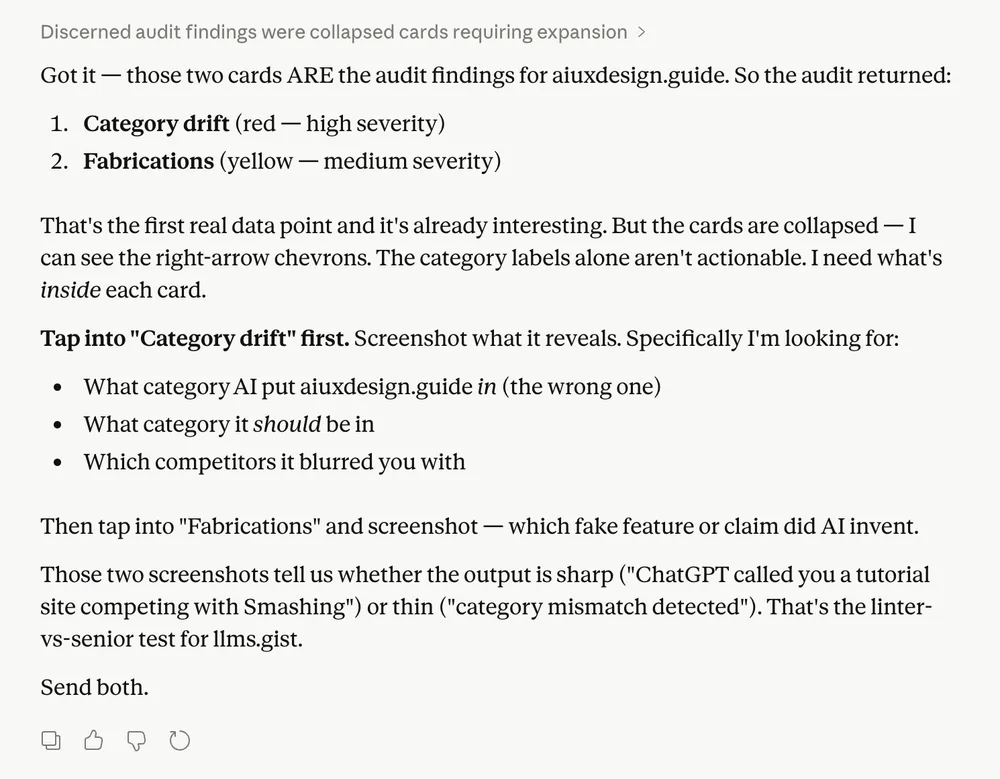
“Not every chat needs a confidence score. The same goes for explainable AI: the audit treated this as the finished screen, when I can highlight any part and ask Claude to follow up. None of these gaps fit a simple chat.”
Imran's note on this audit
Top gap: Confidence Visualization · Missing
Top gap: Progressive Disclosure: collapsed audit-finding cards are unresolvable from within the chat
Guesses now go to a separate Worth checking list
- Does clicking the right-arrow chevron on the collapsed-card bar expand the card content inline, or does it navigate away?
- Does the 'Adaptive' model selector label explain what 'Adaptive' means on hover or click?
Across all screens, advice that guessed fell from 80% to 68%, and on fresh screens the fix had never seen, from 92% to 88%.
Get the one-page checklist
The five steps and a blank review table, as a PDF.
Free, and signs you up to AI UX Daily. Prefer a spreadsheet? Download the review sheet, no email needed.
Want to check every release without re-reading by hand? The AI Evals for Designers course shows how to hand your rule to an AI reviewer.