aiux
PatternsPatternsCoursesCoursesNewsNewsResourcesResources
Overview

Setup

  • Get Your Anthropic API Key
  • Install Node.js
  • Install Claude Code

Figma ↔ Code

  • Set Up Figma MCP
  • Turn Figma Frames into Code
  • Using Figma Links in Prompts
  • Figma to Code Best Practices
  • Bring Code Back to Figma

Prototype

  • Start Your First Claude Code Session
  • Create Your Project Folder
  • Generate Your First Prototype
  • See Your Prototype Live
  • Get Back to Editing

GitHub

  • Create a GitHub Account
  • Create a Repository on GitHub
  • Connect Your Local Project to GitHub
  • Save Your Changes Going Forward
  • Share Your Work & Use Claude's /save Command

Best Practices

  • How to Describe Your Design to Claude Code
  • Testing Your Prototype
  • Iterating Based on Feedback
  • Handing Off Work to Developers
  • Troubleshooting Common Issues
  1. Guides
  2. /
  3. Claude Code Course for Designers
  4. /
  5. Get Your Anthropic API Key
SetupLesson 1 of 23

Get Your Anthropic API Key

2 min readClaude Code for DesignersUpdated Feb 18, 2026

Claude Code needs an API key to connect to the Claude AI service. Your API key is like a secret password that tells Anthropic it's really you.

1

Create an Anthropic Account

  • Go to console.anthropic.com in your web browser
  • Click "Sign up" in the top right
  • Create an account using your email and password
  • Check your email for a verification link and click it
2

Generate Your API Key

  • Once logged in, find "API Keys" in the left menu
  • Click "Create Key"
  • Name it something like "Claude Code for Design"
  • Click "Create"
  • Copy your key immediately and save it somewhere safe (like a password manager)
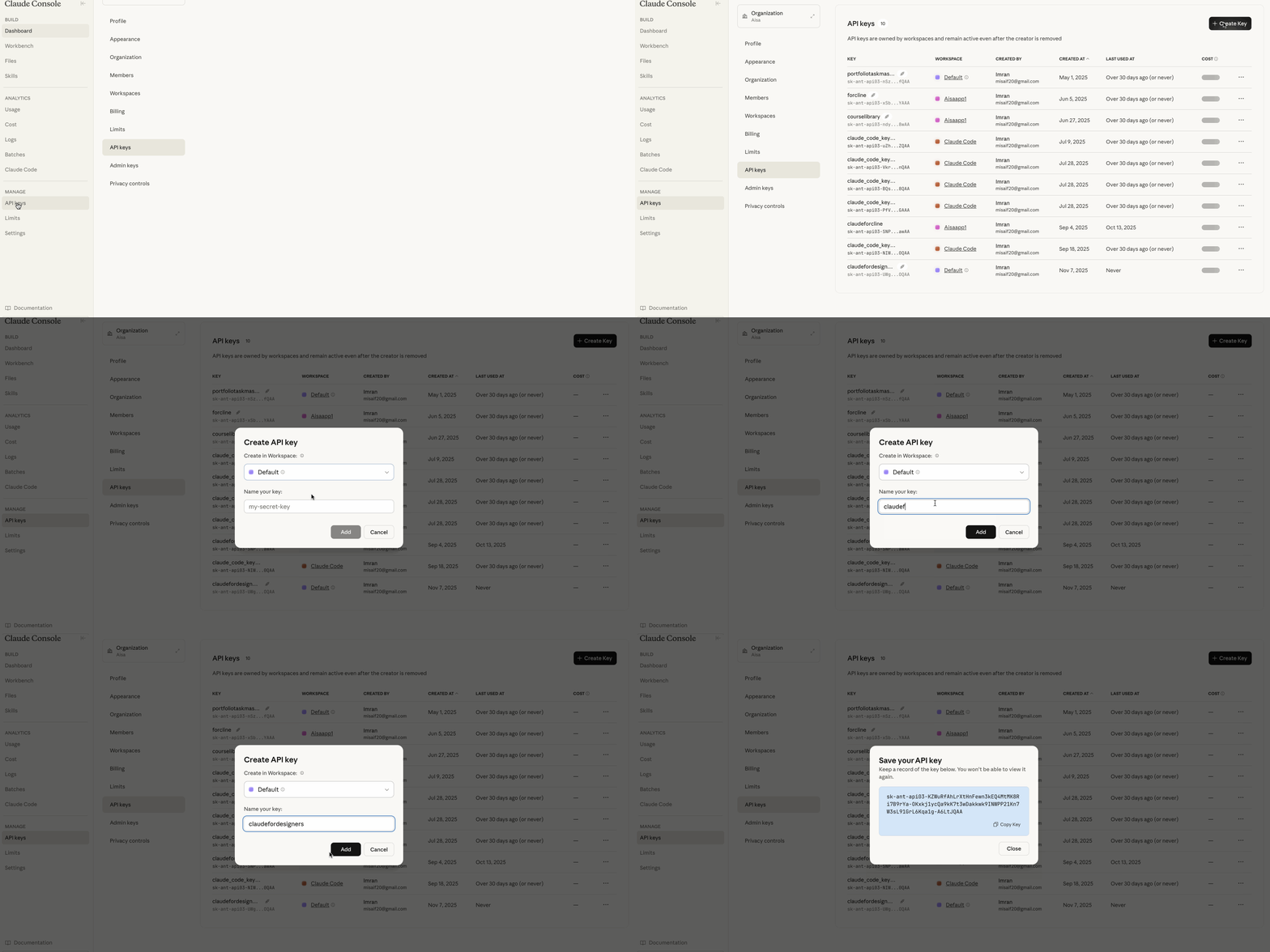
Anthropic Console API Key Screenshot
Anthropic Console showing where to create and copy API keys
Keep Your Key Secure

Your API key is like a password. Never share it with anyone, post it in Slack/email/public docs, commit it to GitHub, or store it in plain text files in your projects.

API key ready

  • Created an Anthropic Console account
  • Generated and copied your first API key
  • Stored it somewhere safe and out of any code files

Next up: getting Node.js running so Claude Code has somewhere to live.

Next Lesson →Install Node.js
← Back to Claude Code Course for Designers overview

aiux

AI UX patterns from shipped products. Demos, code, and real examples.

Have an idea? Share feedback

Get daily AI UX news

Resources

  • All Patterns
  • Browse Categories
  • Contribute
  • AI Interaction Toolkit
  • Agent Readability Audit
  • Newsletter
  • Documentation
  • Figma Make Prompts
  • Designer Guides
  • All Resources →

Company

  • About Us
  • Privacy Policy
  • Terms of Service
  • Contact

Links

  • Portfolio
  • GitHub
  • LinkedIn
  • More Resources

Copyright © 2026 All Rights Reserved.