Master Advanced Features
You've learned the basics. Now, advanced features that take you to expert level: codebase indexing, multi-model AI, context management, and team collaboration.
Codebase Indexing: AI Knows Your Code
When you open a project, Cursor automatically indexes it. The AI scans every file and creates a semantic understanding of your codebase. This is why it can suggest relevant code from anywhere in your project.
@-Mentions: Direct Context
In Chat or Composer, use @-mentions to reference specific files or symbols:
- **@filename.jsx**: Reference a specific file
- **@functionName**: Reference a specific function
- **@className**: Reference a class
- Type @ and see all available options
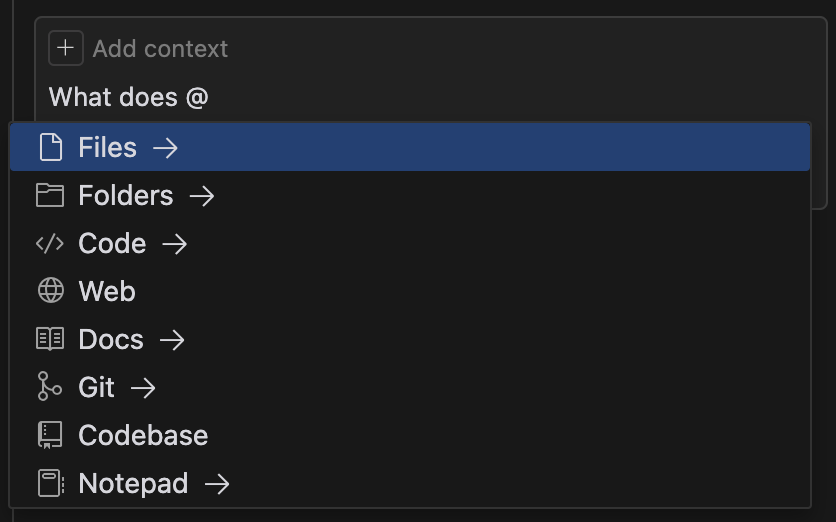
This tells the AI exactly what to consider when generating code.
Multi-Model AI: Choose Your Brain
Cursor supports multiple AI models. Switch between them in the Chat panel:
- **Claude Sonnet & Opus** (Anthropic): Best for analysis and refactoring
- **GPT-5** (OpenAI): Great for creative code generation
- **Gemini** (Google): Good for general tasks
- **xAI models**: Latest experimental models
Different models excel at different tasks. Feel free to try different ones for different work.
# .cursorrules - Tell Cursor about your project

You are an expert React developer working on a design system.

## Code Style
- Use TypeScript with strict mode
- Use Tailwind CSS for styling (never write raw CSS)
- Follow functional components with hooks
- Component exports should be default exports

## Design System
- Primary color: #0066FF (blue-600)
- Spacing: Use Tailwind spacing scale (gap-4, p-2, etc.)
- Fonts: Use system fonts (font-sans) or Inter

## Naming Conventions
- Components: PascalCase (Button, Card, Header)
- Variables: camelCase (buttonText, cardContent)
- Files: kebab-case (button.jsx, card.jsx)

## Testing
- Always add JSDoc comments
- Make components responsive mobile-firstPrivacy Mode: Your Code Stays Private
Pro feature ($20/month): Enable Privacy Mode in Settings. Your code is never:
- Sent to AI providers for training
- Logged or stored on servers
- Used to improve AI models
Context Management: Work Smarter
AI works better with relevant context. Strategies:
- **Close tabs**: Only open files you're actively using
- **Use @-mentions**: Reference specific files instead of context-dumping
- **Provide .cursorrules**: Let your project guidelines guide the AI
- **Use Cmd+Enter for full context**: When you truly need codebase-wide understanding
Bugbot: AI Code Review
Advanced feature: Bugbot automatically reviews your GitHub PRs and suggests improvements:
- Detects bugs and logic errors
- Suggests security fixes
- Recommends performance improvements
- One-click "Fix in Cursor" to apply suggestions
Team Features (Cursor Teams/Enterprise)
For teams ($40/user/month):
- Shared .cursorrules across team
- Centralized billing and usage tracking
- SSO authentication
- Team-wide privacy settings
- Collaboration features
Always review AI-generated code before using it. AI is fast, but human judgment catches edge cases and security issues.
Advanced Features Unlocked!
- You understand codebase indexing and how AI knows your code
- You can use @-mentions for precise context
- You know how to switch between multiple AI models
- You're aware of privacy features and team collaboration
Excellent! You're now using Cursor like an expert. The final lesson covers best practices and team workflows.